Running an Optimization
Prerequisites
Optimization runs against a deckle run, so before you can optimize you need a run: a machine, a paper type and GSM, and at least one Confirmed order width allocated to it. See Creating a Run.
Triggering It
Open the run and click Run Optimisation
Optionally enable Double Run
Wait for it to finish
You can re-optimize at any time before starting the run — after adding orders, changing widths, or adjusting the machine overrides. Each optimization is kept in the run's optimization history.
How the Engine Works
Deckle Plus solves a cutting-stock problem: given the available deckle and a set of widths each with a target weight, find the set of patterns that meets demand with the least trim, within the blade limit. It works in up to two phases:
- Phase 1 — exact target. Solves for each width's exact ordered weight. If the overall and per-pattern waste both clear the machine's targets, this result is accepted straight away.
- Phase 2 — variance search. Only runs if Phase 1 misses the targets. It generates five independent scenarios, each nudging the widths' weights within their allowed variance (rebalanced so total demand is preserved), and returns all five as ranked candidates for you to compare.
Along the way the solver records every step — initial basis, each pattern found, each pivot, phase changes, rounding and pattern absorption — as a replayable log you can open from the optimization view.
Reading the Results
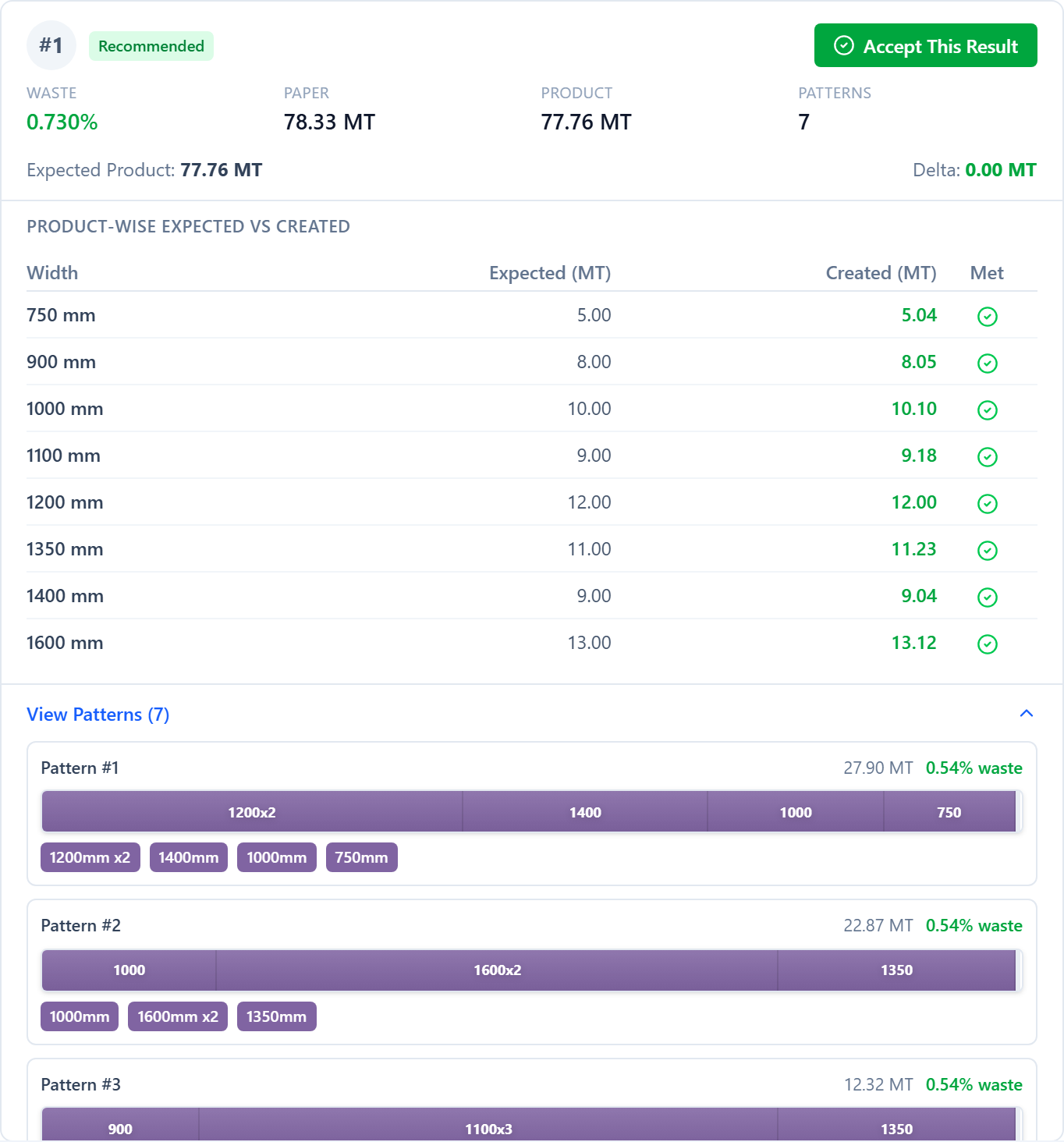
Each result card shows its rank and a label — Recommended, Lowest Waste or Alternative — with four headline numbers: overall Waste %, Paper (MT) consumed, Product (MT) delivered, and Pattern count. Below that, a Product-wise Expected vs Created table shows, per width, the target weight against what this plan actually produces and whether it is met. Expand View Patterns to see each pattern's strip layout and waste bar.
Suggestions & Overruns
A result can carry two kinds of reviewer-facing proposal, neither applied automatically:
- Extra size suggestions — an extra strip of a width that is ordered often but has no order behind it right now, dropped into leftover pattern waste. Choosing Accept with extra size cuts them and credits the paper straight to inventory; they stay removable in the run's sandbox.
- Overrun examples — a pattern that deliberately crosses the available deckle by a small margin (into the trim allowance) to eliminate an otherwise-wasteful pattern. After accepting the result you must open the run's sandbox and have floor staff sign the overrun off before the run can start.
Accepting a Result
Click Accept This Result on the card you want. Deckle Plus materializes its patterns, blade configurations and strip allocations onto the run, marks the run ready to start, and records who accepted it. If the run had blade-limited widths and you enabled Double Run, you accept a double-run proposal instead — which also creates the linked pass-2 run.
Was this page helpful?
Something unclear or missing? Reach out and we'll update this page.