Logging Waste Events
Automatic vs Manual
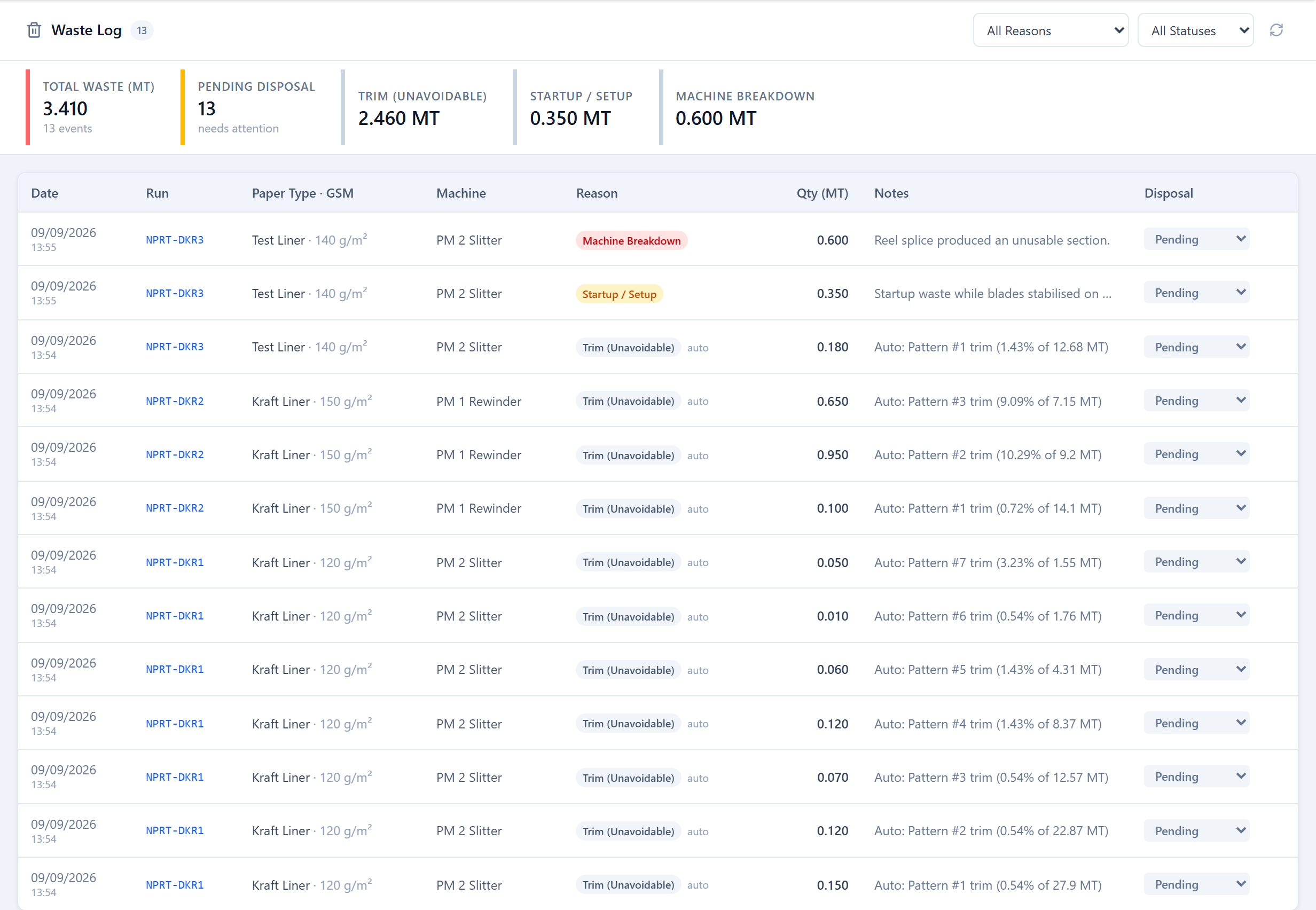
Planned trim waste is calculated and recorded automatically as patterns complete — these events are marked auto. Operators and Planners log manual waste events for anything on top of plan: a bad splice, a machine problem, coating loss, a test run.
Waste Reasons
Every waste event has a reason:
- Trim — normal cutting trim (usually auto).
- Startup — paper run off while the setup stabilizes.
- Machine — a fault, wander or breakdown.
- Coating — coating or surface loss.
- Test run — sample or trial production.
- Other — anything else, explained in the note.
Logging an Event
From a run's detail, add a waste event with a reason, a weight in MT and an optional note. Events belong to the run, so they roll into that run's waste figure and the run appears in the waste reports.
The Waste Log
The Waste Log screen lists every waste event across all runs — date, run, paper type and GSM, machine, reason, weight and note — filterable by reason and by disposal status. Each event's disposal status (Pending, Discarded, Recycled, Sold, Reused) is set here so the scrap yard is tracked end to end.
Was this page helpful?
Something unclear or missing? Reach out and we'll update this page.