Parent-Reel Stock
Stock Balance
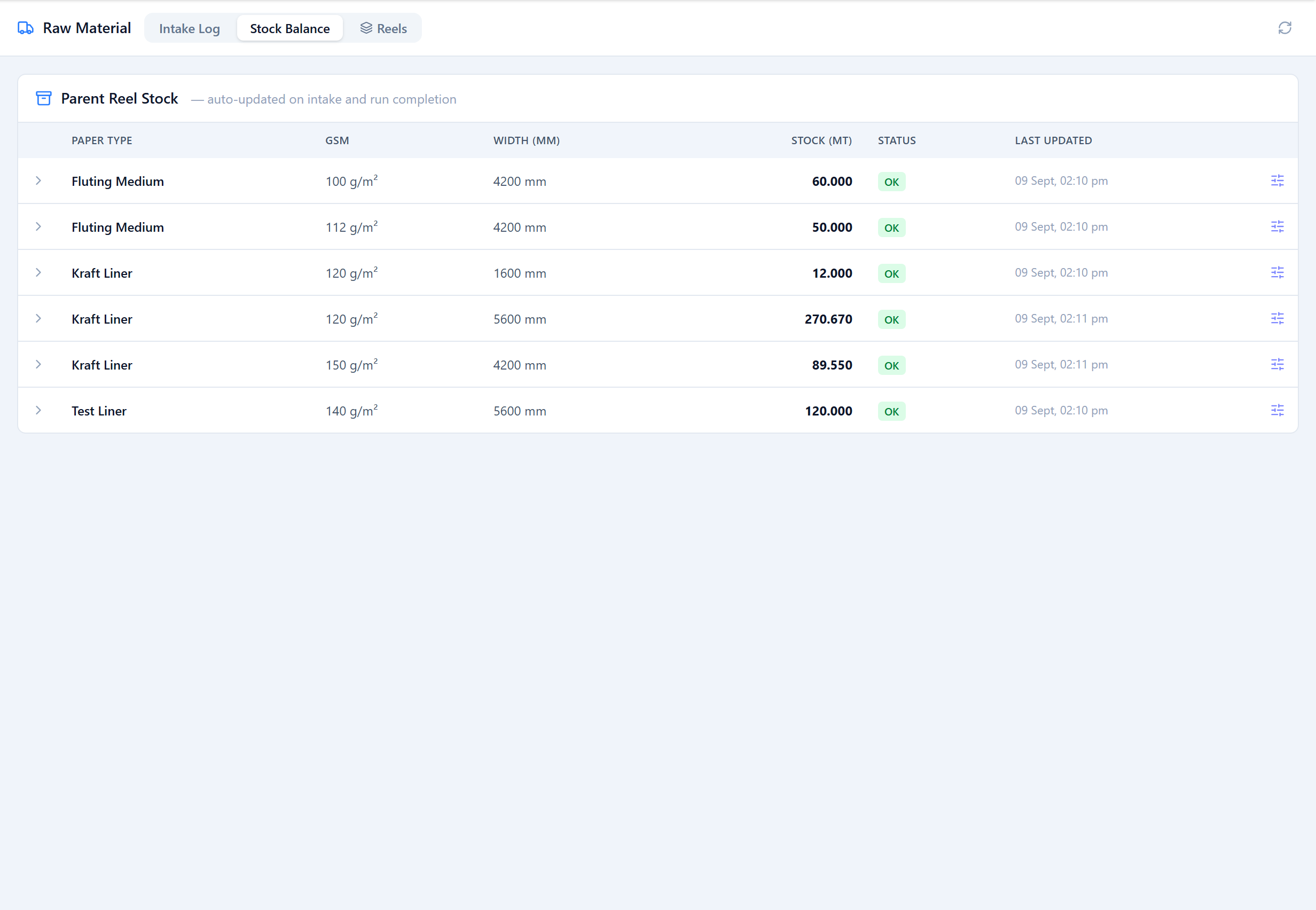
The Stock Balance tab shows parent-reel stock as a running total per paper type, GSM and width. Expand a row to see the individual intakes that make it up, oldest first.
Individual Reels
The Reels tab lists parent reels tracked individually, each with a status — Available, Partial, Consumed or Written Off — and its remaining weight. Reels can be created under an intake, or added directly here; filter by status to see what's on the floor versus fully used.
Reel Fields
| Field | Type | Description |
|---|---|---|
Reel Tag key: reelTag | text | The mill's own reel number or barcode. Used to find the reel and to print its slip. |
Paper Type / GSM / Width key: paperTypeId / gsmId / widthMm | select / number | Left blank, these are inherited from the parent intake. |
Original Weight (MT)* key: originalWeightMt | number | Weight of the reel as received. |
Notes key: notes | text | Optional. |
Adjustments & Status
A tracked reel can be adjusted: set its remaining weight, change its status (Available / Partial / Consumed / Written Off), and add a note explaining the correction. Bucket-level stock can also be corrected with a manual weight delta and a reason. Both kinds of adjustment appear in the transaction history alongside intakes and production draws.
Was this page helpful?
Something unclear or missing? Reach out and we'll update this page.