Paper Types & GSM
Overview
A paper type is a grade you produce; each one holds one or more GSM values, and each GSM carries its own minimum trimming. Together they are the master data the optimizer and inventory run against. Paper types are managed under Setup → Paper Types and only Admin accounts can change them.
Paper Grades
Grades are free text — you name them to match your mill (Kraft Liner, Duplex Board, Cylinder Mould, Newsprint, MG Kraft, and so on). A grade has:
| Field | Type | Description |
|---|---|---|
Grade Name* key: name | text | e.g. "Kraft Liner". Adding a GSM under a name that already exists appends to that grade. |
Average Parent Reel Weight (MT) key: avgParentReelWeightMt | number | Overrides the organization default. Used to estimate how many finished reels a completed pattern produced. |
Notes key: description | text | Handling instructions or any grade-specific context. |
Grades are not tagged as REEL / SHEET / THERMAL — the width type is chosen per order line, so any grade can be used for any width type.
GSM & Minimum Trimming
Under each grade you add GSM rows. Every row is:
| Field | Type | Description |
|---|---|---|
GSM* key: gsmValue | integer | Grams per square metre. |
Minimum Trimming (mm)* key: minimumTrimming | integer | Edge trim this GSM needs. The optimizer's usable width is the machine deckle minus this value. |
Notes key: description | text | Optional. |
Minimum trimming is per GSM
It is not a machine setting and not an optional override — every GSM must have one. The same value applies on every machine; the available deckle it leaves differs by machine because deckle widths differ.
Available Deckle Helper
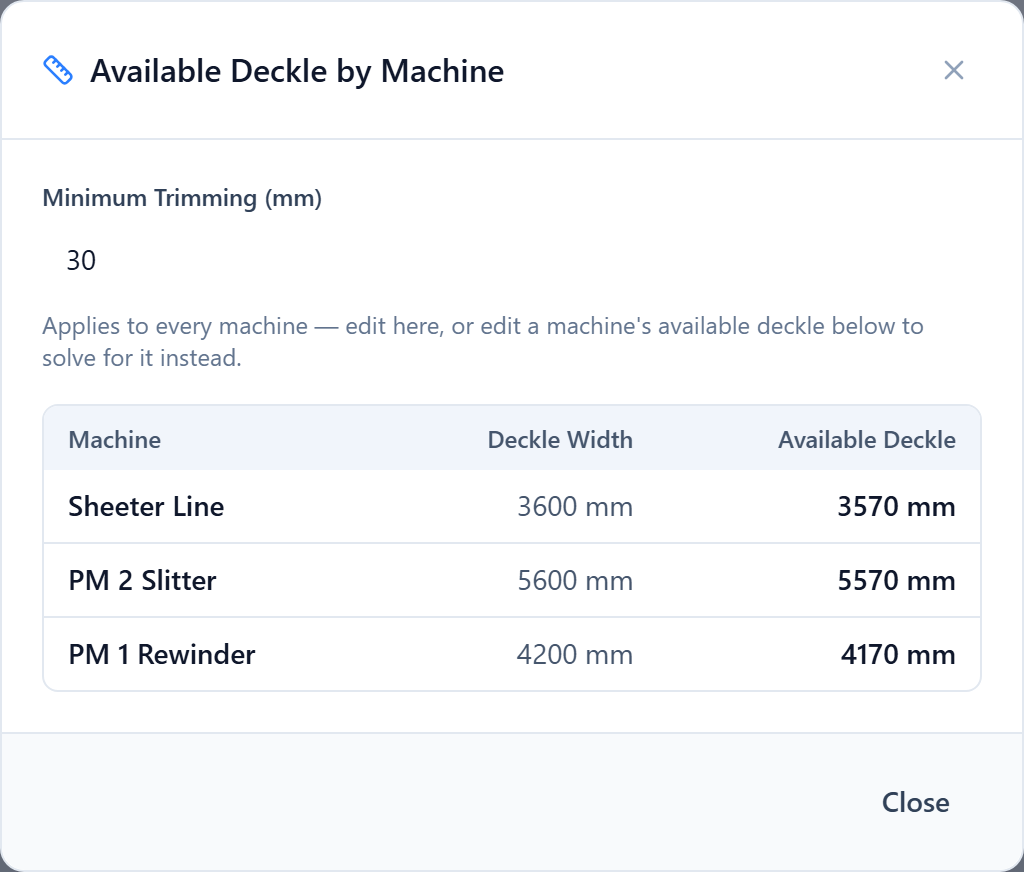
Next to each GSM row is an Available Deckle button. It opens a table of every machine showing available deckle = deckle width − minimum trimming. You can type a trim value and see the effect on all machines, or type the available deckle you want on one machine and let it solve for the trim.
Average Parent Reel Weight
When a pattern finishes, Deckle Plus estimates how many finished reels it produced by dividing produced weight by an average reel weight. That average comes from the organization default unless a paper type overrides it here. If neither is set, reel-count estimates are skipped for that grade.
Descriptors
Two orders can share a paper type and GSM but still differ in a spec that matters on the floor — burst factor, KIT value, brightness. Model those as descriptors under Setup → Descriptors: named attributes with a set of allowed values. Descriptor values are recorded on order widths, and a run can be pinned to one descriptor combination so only compatible orders are cut together.
Discontinuing a Grade
Use Discontinue on a grade to hide it and all its GSMs from new orders and runs. Existing orders, runs and stock that reference it are untouched. Individual GSM rows can also be edited or removed from the grade's detail view.
Was this page helpful?
Something unclear or missing? Reach out and we'll update this page.