Machine Configuration
Overview
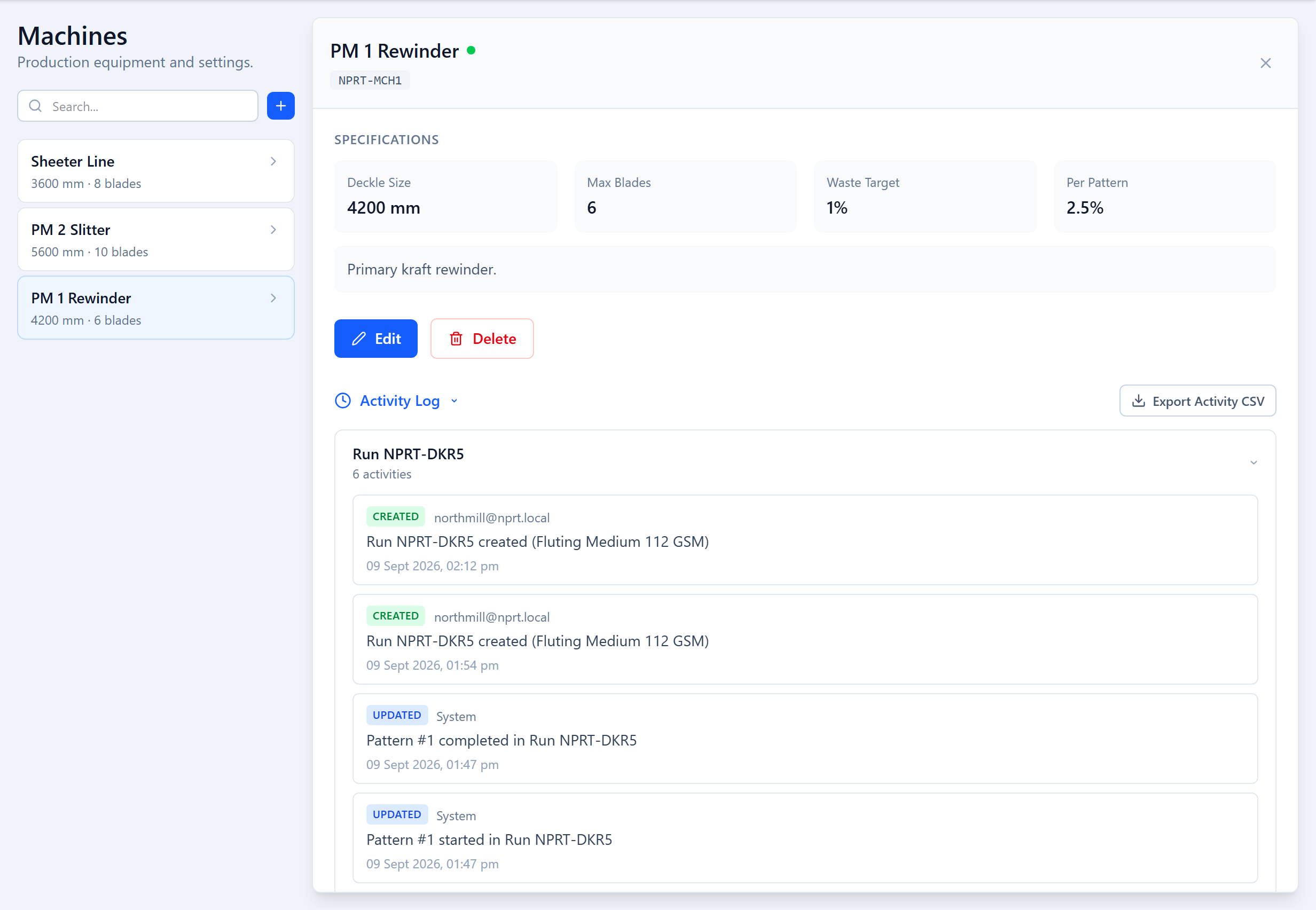
Each machine that cuts parent reels — a winder, rewinder or slitter — is a machine record in Deckle Plus. The record stores the constraints the optimizer respects when it builds patterns for that machine. Machines are managed under Setup → Machines and only Admin accounts can create, edit or delete them. There is no limit on the number of machines.
Machine Fields
| Field | Type | Description |
|---|---|---|
Machine Name* key: name | text | Shown throughout the app, e.g. "Winder A" or "Slitter Line 2". |
Deckle Size (mm)* key: deckleWidth | integer | Maximum usable parent-reel width. Order widths wider than this cannot be run on this machine. |
Max Blades* key: maxBlades | integer | Number of blade positions the slitter can hold. The optimizer never proposes a pattern that needs more. |
Max Waste Target (%) key: maxWasteTarget | number | Target ceiling for total trim waste across a run. Optional. |
Per Pattern (%) key: perPatternMaxWasteTarget | number | Target ceiling for the waste of any single pattern. Optional. |
Notes key: description | text | Free text — maintenance notes, special capabilities, anything planners should know. |
A machine also carries a short system tag and an operational status, both covered below.
Max Blades
Max Blades caps how many blade positions a single pattern may use. If Max Blades is 8, the optimizer will never return a pattern that needs a 9th blade, even if that would cut waste further.
Every blade position counts
Repeated widths still cost a blade each. A pattern of 900 + 900 + 900 + 300 uses four blade positions, not two. Set Max Blades to the number of blades the machine physically carries.
When a width needs more blades than the machine has to satisfy its demand in one pass, the optimizer may propose a double run — a two-pass plan that cuts wider intermediate reels first, then re-slits them. See Blade & Waste Constraints.
Waste Targets
Both waste targets are optional and act as acceptance thresholds, not hard limits:
- Max Waste Target (%) — the overall trim-waste ceiling. If the first optimization pass meets both this and the per-pattern target, that result is accepted directly.
- Per Pattern (%) — the ceiling for any individual pattern's waste.
If a straight solve can't meet the targets, the optimizer runs a second pass that uses each order width's allowed variance to search for a better mix, and returns several candidate results for a planner to compare. You always get the best achievable plan for the given orders and machine — the targets only decide whether a planner is asked to choose. Leave both blank to simply minimize waste.
Per-run Overrides
When you create a run, the New Run wizard pre-fills the machine's reel width, available deckle and blade count, and lets you override any of them for that run only — for example to model a narrower parent reel or a temporarily reduced blade set. The machine record itself is unchanged.
Machine Status
Each machine record carries an operational status (operational, or down with a reason and an expected-back time). When a machine is unavailable, move its queued runs to another machine from the Scheduler so the floor queue stays accurate.
Activity Log
Open a machine to see its Activity Log — every create, edit and delete touching that machine, grouped by the run it relates to, with the actor and timestamp. It can be exported to CSV.
Multiple Machines
Every run targets exactly one machine and uses only that machine's constraints. To evaluate the same orders on two machines, create two runs. Deleting a machine is a soft delete — its historical runs and their data are preserved.
Was this page helpful?
Something unclear or missing? Reach out and we'll update this page.